
On-Page SEO Essentials: How to Maximize Your SEO Performance
- John Carlo Cabatuan
- Sep 6, 2024
- 11 min read

Updated: Oct 10, 2024
What even is On-Page??
On-site SEO, also known as on-page SEO, involves optimizing different front-end and back-end elements of your site to boost its search engine ranking and attract more visitors.
On-page SEO might sound technical, but it’s all about making your website more appealing to both search engines and visitors. Whether you’re a business owner, blogger, or digital marketer, mastering on-page SEO can significantly improve your website’s rankings.
On-page optimization involves fine-tuning various elements on your web pages to make them more search-engine friendly.
This guide will walk you through the steps required to perform effective on-page optimization to boost your visibility on search engines and attract more organic traffic.
Why is On-Page Optimization Important?
On-page optimization is essential because it directly affects how search engines interpret your website's content. When done correctly, it improves your site's relevance and authority for specific keywords, resulting in higher rankings on search engine results pages (SERPs).
On-page optimization helps ensure that your web pages are:
Relevant to the search queries you want to rank for
Easy to navigate for both users and search engine bots
Engaging, so users spend more time on your page (lowering bounce rates)
Let’s dive into the steps of successful on-page optimization.

Step 1: Conduct Thorough Keyword Research
At the heart of on-page SEO is keyword research. Keywords help search engines understand what your content is about and connect it with users who are searching for similar information.
Your goal is to identify the keywords and phrases your target audience is using to search for the content or services you offer.
Start with Keyword Research Tools
The most popular tools for keyword research include Google Keyword Planner, Ahrefs, and SEMrush. These tools allow you to enter topics related to your business or content and discover:
Search volume (how often people search for specific terms)
Keyword difficulty (how hard it is to rank for a keyword)
Keyword trends (whether a keyword’s popularity is increasing or decreasing)

This data helps you select the most effective keywords to target.
Example: If you run a travel blog about the Philippines, you might start by entering a broad term like "Philippines travel" into one of these tools. You’ll discover keywords like "best places to visit in the Philippines," "Philippines travel itinerary," or "Philippines travel guide 2024," each with different search volumes and levels of competition.
Long-Tail Keywords: Why They Matter
Long-tail keywords are longer, more specific phrases that usually have lower search volume but are easier to rank for.
They also tend to align more closely with user intent, meaning the people who search for these terms are often closer to taking action—whether that’s making a purchase, subscribing to a service, or consuming content.
Example: A broad keyword might be “running shoes,” but a long-tail version could be “best running shoes for marathon training.” A person searching for the long-tail keyword likely has a specific need and is further along in their buying journey.
Prioritize Relevance and Intent
Always choose keywords that are relevant to your content. It’s tempting to chase high-volume keywords.
But if ,
those keywords don’t match the content on your page, you’ll struggle to engage your audience—and that can hurt your SEO rankings.
Tip: As you research, think about the user intent behind each keyword. Are they looking to make a purchase, learn something new, or compare options? Understanding this will guide how you structure your content.
In summary:
Use Keyword Tools: Start with keyword research tools like Google Keyword Planner, Ahrefs, or SEMrush to find relevant keywords with good search volume and moderate competition.
Focus on Long-Tail Keywords: Long-tail keywords are more specific and less competitive, making them easier to rank for. They also tend to have higher conversion rates because they are more closely aligned with user intent.
Prioritize Relevance: Ensure the keywords are relevant to your content and provide real value to your audience.

Step 2: Write Click-Worthy Meta Tags
Meta tags are critical for on-page optimization. They include the title tag and meta description—the small snippets of text that show up in search engine results pages (SERPs).
These tags help both search engines and users understand what your page is about.
Focus on optimizing the following meta tags:
Title Tag Optimization
The title tag is one of the most important on-page SEO elements. It tells search engines what your page is about, and it’s the first thing users see in the search results.

Include the Primary Keyword: The primary keyword should appear at the beginning of your title tag.
Make It Catchy: Your title should grab attention and make users want to click. Aim for clarity and a bit of intrigue.
Character Limit: Keep your title between 50-60 characters to ensure it displays properly.
Example: If your page is about the best restaurants in Manila, a good title tag might be: “Best Restaurants in Manila 2024 | Top Dining Spots You Must Try!”
Meta Description Optimization
The meta description is the summary of your page that appears under the title in search results. It should give users a clear idea of what to expect if they click through to your page.
Include Keywords: Place the primary keyword naturally within the description.
Character Count: Keep it between 150-160 characters for optimal display.
Add a Call-to-Action: Encourage users to click by using phrases like "Learn more," "Find out," or "Discover."
Example: A meta description for the same restaurant page might be:
“Looking for the best restaurants in Manila? Discover our top picks for dining in the city, from hidden gems to must-visit spots in 2024.”
Step 3: Structure Your Content with Header Tags
When it comes to on-page SEO, how you structure your content is just as important as the content itself. Search engines love well-organized content because it makes it easier to understand the page’s hierarchy.
Properly structured content is easier for both search engines and users to understand. Use header tags (H1, H2, H3, etc.) to break down your content into logical sections.
The Role of the H1 Tag
The H1 tag is the main heading of your page and should include your primary keyword. This tag signals to both search engines and users what your page is about.
Only use one H1 tag per page.
Ensure it clearly indicates the topic of the page.
Example: For a page about marathon training tips, your H1 could be “Essential Marathon Training Tips for Beginners.”
Using H2 and H3 Tags for Subtopics
After the H1 tag, use H2 and H3 tags to structure your content. These tags help break up the text into subsections and make it easier for users to skim the page.
H2 tags should introduce major subtopics, while H3 tags break down those subtopics into more specific points.
Properly using header tags can also help your content appear in featured snippets—the answer boxes that sometimes appear at the top of Google’s search results.
Example: If your H1 is "Marathon Training Tips for Beginners,"
you might use an H2 tag like,
“Nutrition Tips for Marathon Runners”
and H3 tags under it like,
“Pre-Run Meals” and “Hydration Strategies.”

Step 4: Optimize Content for On-Page SEO
Creating high-quality content is essential for SEO success. The trick is to find a balance between optimizing your content for search engines and making it engaging and easy to read for humans.
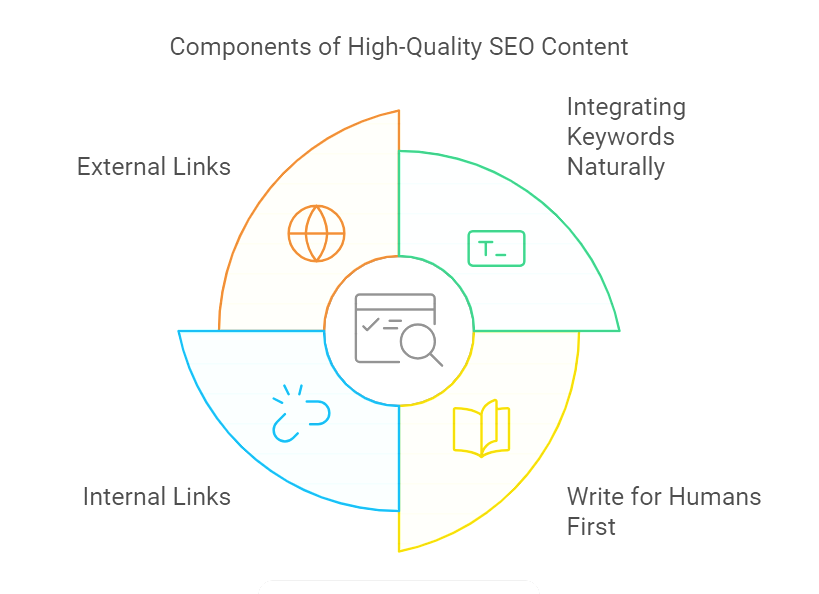
Integrating Keywords Naturally
While it’s important to include your target keywords throughout your content, be careful not to overdo it. Keyword stuffing—the practice of overloading a page with keywords—can negatively impact both user experience and SEO.
Instead, focus on using keywords naturally. Aim for:
Keyword density between 1-2% of your total word count.
Synonyms and related terms that add variety and context to your content.
Write for Humans First, Search Engines Second
While it’s tempting to write for search engines, your first priority should always be your readers. The better your content is, the more likely people will engage with it, share it, and spend time on your page—all of which are positive signals for SEO.
Here are some tips for writing human-friendly content:
Use short paragraphs and bullet points to break up the text.
Vary the length of your sentences to keep readers engaged.
Avoid jargon unless it’s necessary for your audience.
Example: Instead of writing, “Our company’s offerings include various methodologies for enhancing SEO,” you could say, “We use tried-and-tested strategies to improve your SEO.”
Internal and External Links
Internal links point to other pages on your site and help search engines understand the structure of your site. External links, on the other hand, point to reputable sources outside of your site.
Both types of links provide value:
Internal links improve navigation and help users find more of your content.
External links signal to search engines that you’re providing valuable resources from credible sources.
Step 5: Optimize Images and Media
Images and other media can enhance the user experience, but they also need to be optimized for on-page SEO.
Use Descriptive File Names: Rename your image files with descriptive names that include target keywords before uploading them to your website.
Add Alt Text: Provide alt text for each image to describe what it shows. This not only helps visually impaired users but also improves your SEO by providing additional context to search engines.
Compress Media Files
Large media files can slow down your site, leading to a poor user experience and higher bounce rates.
Compressing your images and videos reduces their file size without sacrificing quality. Tools like TinyPNG, JPEG-Optimizer, and Compressor.io can help compress images without noticeable loss in quality.
JPEG format is great for photos.
PNG format works best for images with transparent backgrounds or logos.
Image optimization tools
ImageOptim (Mac only)
Kraken (bulk compression)
Pixlr (JPEG optimization)

Step 6: Improve Page Speed and Mobile-Friendliness
Lazy loading ensures that images and videos only load when they come into the user’s viewport (i.e., when the user scrolls to that section of the page).
This reduces initial page load time and improves performance. Many website platforms, like WordPress, offer plugins that enable lazy loading with minimal effort.

Focus on Mobile Optimization
With more than half of all web traffic coming from mobile devices, mobile optimization is no longer optional—it’s essential. Mobile-friendly websites rank better on Google, thanks to its mobile-first indexing strategy. Here’s how to make sure your site is optimized for mobile users.
Use a Responsive Design
A responsive design automatically adjusts your website’s layout to look good on all screen sizes, from desktops to smartphones. This ensures that your content, images, and menus are easily accessible, no matter the device.
Tip: Most modern website platforms, like WordPress and Shopify, offer responsive themes, but you can also test your site’s mobile-friendliness using Google’s Mobile-Friendly Test Tool.
Improve Mobile Page Speed
Mobile users expect fast load times, and a delay of even a second can lead to higher bounce rates. Compressing images, enabling lazy loading, and leveraging browser caching are just a few ways to speed up your mobile site.
Tip: Use tools like Google PageSpeed Insights to identify areas where you can improve your site’s speed on mobile.
Improve Page Load Speed
Page load speed is a critical ranking factor for both desktop and mobile searches. A slow website can lead to high bounce rates, which signals to Google that users aren’t finding your content valuable.
Minimize HTTP Requests
Every element on a web page—such as images, scripts, and stylesheets—requires an HTTP request to load. The more requests a page has to make, the longer it takes to load. You can minimize these requests by:

Combining CSS and JavaScript files.
Reducing the number of plugins and external scripts.
Using browser caching to store resources locally on users' devices for faster loading times on repeat visits.
Optimize CSS, JavaScript, and HTML
Minifying your site’s CSS, JavaScript, and HTML code means removing unnecessary spaces, comments, and characters. This reduces the file sizes and speeds up your website.
Tools like UglifyJS and CSSNano can help you minify code automatically.
Leverage Browser Caching
Browser caching allows your website to store copies of static files on users’ devices. This reduces load times for returning visitors because their browser doesn’t need to download all the resources again.
Use a Content Delivery Network (CDN)
A Content Delivery Network (CDN) distributes your website’s content across various servers around the globe. When a user visits your site, the content is delivered from the server closest to their location, reducing latency and speeding up load times.
Popular CDN providers include Cloudflare, Amazon CloudFront, and Akamai.
Step 7: Optimize for User Experience (UX)
While SEO focuses on making your site discoverable to search engines, User Experience (UX) optimization ensures that visitors find it easy and enjoyable to use. A good UX can lead to longer dwell times, lower bounce rates, and ultimately better rankings.
Clear Navigation
Clear and intuitive navigation helps users find what they’re looking for quickly. If visitors can’t find the information they need, they’ll leave—leading to higher bounce rates and a negative impact on your SEO.
Use a simple and logical menu structure.
Ensure that all important pages are no more than three clicks away from the homepage.
Reduce Pop-Ups and Intrusive Ads
While pop-ups can be effective for lead generation, they can also frustrate users if overused. Google penalizes sites with intrusive interstitials (pop-ups that cover the entire page) on mobile, so keep them to a minimum or use exit-intent pop-ups that only appear when users are about to leave.
Optimize Forms for Conversions
Forms are essential for capturing leads, but they need to be user-friendly. Keep forms short, only asking for necessary information.
The easier it is for users to fill out a form, the more likely they are to complete it.
Step 8: Implement Schema Markup for Rich Snippets
Schema markup is a form of microdata that you can add to your website’s HTML to provide search engines with more detailed information about your content.
This can lead to rich snippets, which are enhanced search results that include additional information, like star ratings, prices, or event details.
Types of Schema Markup
There are several types of schema markup that can help improve your SEO:
Product Schema: Displays product prices, availability, and reviews directly in search results.
Article Schema: Highlights key information from blog posts or news articles.
Local Business Schema: Provides search engines with your business’s contact information, opening hours, and location.

How to Add Schema Markup
While adding schema markup manually requires some knowledge of HTML, there are tools and plugins that make it easier.
For example, Yoast SEO (for WordPress users) and Google’s Structured Data Markup Helper can guide you through the process of adding structured data to your site.
Step 9: Monitor and Analyze Your Results
SEO is not a set-it-and-forget-it strategy. Search engines constantly update their algorithms, and competitors may also be optimizing their content. Regular monitoring and updates are essential to maintaining and improving your rankings.
Track SEO Metrics
Use tools like Google Analytics and Google Search Console to track important SEO metrics, such as:
Organic traffic: How many visitors are coming to your site from search engines.
Bounce rate: The percentage of visitors who leave after viewing only one page.
Conversion rate: How many visitors take a desired action, like signing up for a newsletter or making a purchase.

Perform Regular SEO Audits
An SEO audit helps you identify areas of improvement and ensure your site is up-to-date with the analysis's current performance, identify new opportunities, and ensure you’re following the latest SEO best practices.
Regular audits help catch technical issues that may hurt your rankings or reveal new keywords to target.
Stay Updated with Algorithm Changes
Google frequently updates its ranking algorithms, which can affect your site’s SEO performance.
Staying informed about major updates and trends in the SEO industry ensures that you adapt your strategy as needed.
Following authoritative sources like Moz, Search Engine Journal, or Google’s official webmaster blog can help you stay on top of these changes.
On-page SEO Summary
On-page optimization is a vital part of any successful SEO strategy. By focusing on keyword research, meta tags, structured content, media optimization, page speed, and mobile-friendliness.
You can improve your website's visibility and attract more organic traffic.
Remember, SEO is an ongoing process—continuously monitor your performance and adjust your strategies to stay ahead of the competition.
By following these steps, you'll be well on your way to mastering SEO on-page optimization and achieving higher rankings in search engine results.


Comments